

Find your footage
and photos faster.
Search every video and photo on every drive you own, even unplugged ones.
Search by picture, by face, or by spoken words




- Mac app notarized by Apple. It passed Apple’s automated check for malicious software.
- Panel for Adobe Premiere on Adobe’s Creative Cloud Marketplace.
- Searches on your computer. Your footage isn’t uploaded to be searched.
Works withAdobe Premiere · DaVinci Resolve · Final Cut Pro · Frame.io · Claude · ChatGPT · iCloud Drive · Dropbox · Google Drive
Watch Sift find the shot.
All your footage and photos. Wherever they live.
- Every driveInternal, external, RAID and NAS.
- Even unpluggedArchive drives stay searchable.
- Frame.ioYour projects, next to your drives.
- Cloud foldersiCloud Drive, Google Drive and Dropbox folders synced to your computer.
Tens of thousands of photos. One search.
Sift is for photos as much as video. Type what you remember or a person’s name, and find it in seconds.
- People and momentsName someone once, then find them across your library.
- RAW, JPG and HEICCanon, Nikon and other camera RAW files, read right on your computer.
- Clear the duplicatesSee the extra copies and send them to the Trash. One always stays.
- Share by linkPeople view your picks in any browser and download them.
Every clip. One search.
Add your drives once, then find and play any moment.
 Matt
People
Search →
Sync. Search. Insert.
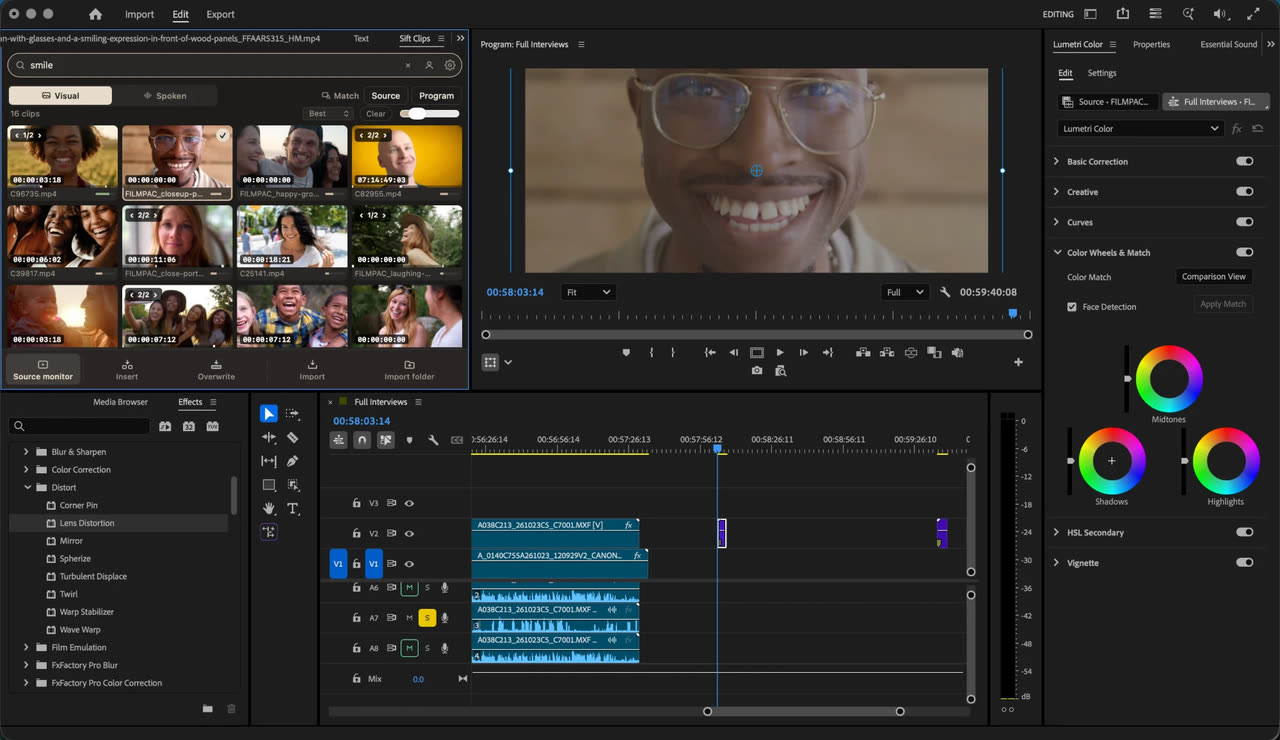
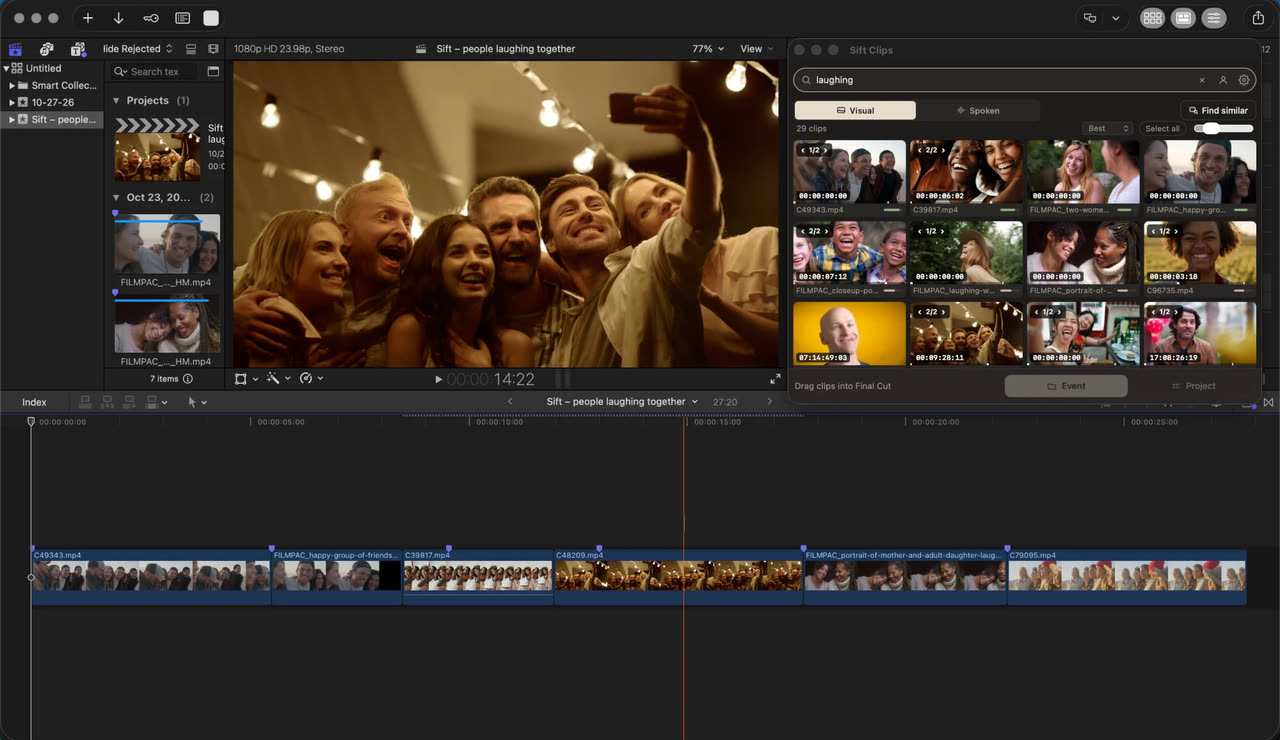
Search from a panel inside Adobe Premiere, DaVinci Resolve or Final Cut Pro, then put the clip on your timeline. The Premiere panel is also on Adobe’s Creative Cloud Marketplace.

 SiftEffectsMarkersMattSearch the picture, or people…
Kitchen_04
 Flour_CU_02
 Lake_01
Find the line
they said.
Type what someone said. Sift finds every take and plays and shows you the moment. How spoken search works.
Share footage and photos
they can search.
Pick folders, or clips from search or Selects, and invite people by email. Your producer or client opens the link on any phone or computer, searches what was said, what’s on screen and who’s in it, and sends their Selects back to your Sift. No app, no account.
Share a link
Selects · Youth Night · 14 clips
watch.siftclips.com/Xg71nKdX9TGm

Simple pricing.
Sift for each editor, and Link sharing when you want others to search your footage and photos too. Try it free first.
Sift · for each editor
Free for 3 days or 25 searches. No card. The 3 days start when your first footage is ready to search, so preparing it never uses your trial.
- Visual, Spoken and People search across all your footage
- Unlimited folders and drives, synced as you shoot
- Optional Premiere, DaVinci Resolve and Final Cut Pro panels
- Selects with notes, and .sift files for other editors
- One free link: 10 minutes of video or 100 photos, open 3 days
- Every update while you’re subscribed
One computer per license · Mac (Apple Silicon, macOS 15+) or Windows 10/11 · Your footage isn’t uploaded to be searched
Buying for a team? We offer volume pricing for 5 or more computers. Email support@siftclips.com.
Questions, answered.
What is Sift?
Sift (Sift Clips) is a desktop app for Mac and Windows that finds any shot in your footage by what’s on screen, what’s said and who’s in it. It works on its own. It also works inside Premiere, DaVinci Resolve and Final Cut Pro. Indexing and search run on your computer.
How much does Sift cost?
$99 a year for one computer, Mac or Windows. Free for 3 days or 25 searches. No card. The 3 days start when your first footage is ready to search, so preparing it never uses your trial. Everything already in Sift stays if a trial or subscription ends.
Does Sift work with photos?
Yes. Sift searches photos and video in one library, including RAW, JPG and HEIC. Find people, clear duplicates, gather your picks and send them by link. See Sift for photos.
Does my footage get uploaded?
Not to be searched. Sift indexes and searches on your computer. Only footage you share with Link sharing goes online, as small 540p copies, and it comes down when the link ends.
Does it work with Premiere, DaVinci Resolve and Final Cut Pro?
Yes, as an option. You don’t need either editor to use Sift. If you do, the panels are included: search from inside your editor, then insert at the playhead in Premiere, import to bins, append or place at the playhead in DaVinci Resolve, or drag it into the timeline in Final Cut Pro.
What do I need?
An Apple Silicon Mac (M1 or newer) with macOS 15 or newer, or a 64-bit Windows 10 or 11 PC. First setup downloads the search models.
Does Sift work with ChatGPT or Claude?
Yes. In Sift, open Integrations and click Connect to add Sift to the Claude or ChatGPT desktop app. Then ask it to find, check and line up shots: it searches on your computer, links you to each moment in Sift, and asks you before it sends or shares anything. It never edits your sequence, and your video stays on your computer. What an assistant can do with Sift.
Can I send footage to a client or producer?
Yes, with Link sharing. Pick folders, or clips from search or Selects, and invite people by email or copy the link. They open it in any browser with no app or account, search it, and send Selects back to your Sift. One free link comes with Sift; plans start at $29 a month. How Link sharing works.
More in Help, or write to support@siftclips.com.