
Final Cut Pro
Final Cut edits it. Sift finds it.
Final Cut Pro searches the library you have open. Sift searches everything you’ve shot, on every drive, and hands Final Cut just the moment you need.
In short: Sift is a Mac and Windows desktop app that finds any shot in your footage by what’s on screen (Visual), what’s said (Spoken) and who’s in it (People). On the Mac it adds a panel inside Final Cut Pro. Final Cut’s own search covers the clips in the library you have open; Sift covers every folder and drive you add, including old projects and footage you never imported, finds people by name and finds shots that look alike. You drag the moment you want into Final Cut, trimmed and marked, linked to your original file.
No editor needed. Sift works on its own as a desktop app on Mac and Windows: search, preview, build Selects and share footage by link without opening an editor. The editor panels are optional.
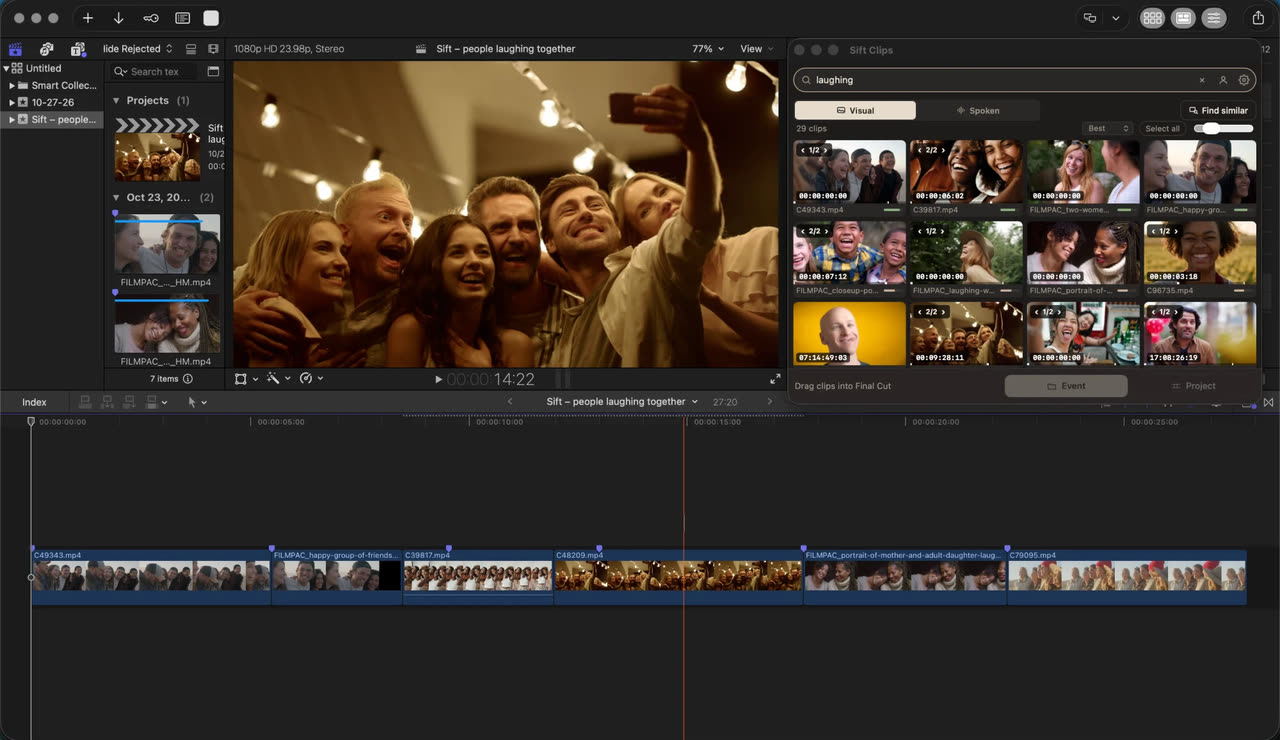
Side by side.
| Final Cut Pro on its own | With Sift | |
|---|---|---|
| What it searches | Clips in the library you have open, once Final Cut has analyzed them | Every folder and drive you add, imported or not |
| Old projects and archives | Only after you open or import them | Always searchable, even with the drive unplugged (marked Offline) |
| People | Filters for shots with people in them | People by name: “every clip of Maya” |
| More like this shot | Not in Apple’s guide | Drop a clip on the panel: Find similar |
| Bringing footage in | Import files or folders | Drag in just the moment, trimmed, with a marker, linked to your file |
| Other editors | Final Cut only | Same library in Premiere and Resolve; Selects travel as .sift files |
Final Cut and Sift, together.
Final Cut Pro 12 can search the clips in an open library by what’s in the picture and what’s said, once it has analyzed them. For footage that’s already in your library, that’s often all you need.
Sift is for everything around that library: last year’s projects, archive drives, cards you haven’t imported. It keeps all of it searchable in one place, then hands Final Cut only the moment you need. Final Cut stays where you edit; Sift is where you find.
Reach for Sift when:
- the shot is on an old drive or in another project, not in this library;
- you need a person: “every clip of Maya”, “Maya laughing”;
- you have one good shot and want more like it;
- you don’t want to import a whole card or drive just to search it;
- you also cut in Premiere or Resolve, or hand Selects to another editor.
How it works.
- Add your drives
Point the Sift app at your footage folders and drives. It indexes them on your computer and notices new footage as you shoot.
- Open the panel
In Final Cut Pro, choose Window › Extensions › Sift Clips. It comes with the Sift app.
- Find and drag
Search, then drag the moment into your timeline or browser, or send picked clips to a new event or project.
What the panel does.
Clips arrive trimmed to the moment you found, with a marker on it, in the open project’s event.
Drag a clip from Final Cut’s browser onto the panel to find the shots that look most like it.
Send a Selects group as a new event, with a keyword range and marker on each moment, and optionally a project in order.
Clips link to your original files; nothing is copied into the library.
Questions
Doesn’t Final Cut Pro already have search?
Yes, for clips in the library you have open, once they’re analyzed. Sift searches every drive and project you add, imported or not, finds people by name and finds similar shots, then hands Final Cut the moment.
Which version of Final Cut Pro does it work with?
Sift’s panel has been tested with Final Cut Pro 12.4. Sending Selects uses Final Cut’s XML format, which Final Cut Pro 10.6 and later can open.
Does it copy my footage into the library?
No. Clips from Sift link to your original files, like importing with “Leave files in place”.
Does it work on Windows?
Final Cut Pro runs only on the Mac, so the panel does too. Sift itself runs on Mac and Windows.
What does it cost?
$99 a year for one computer, Mac or Windows. Free for 3 days or 25 searches. No card. The Final Cut Pro, Premiere and DaVinci Resolve panels are included.
Updated 2026-10-22
Try it on your own footage.
Free for 3 days or 25 searches. No card. Then $99 a year for one computer, Mac or Windows. Everything in Sift, including the optional editor panels and one free link to share footage.