
Adobe Premiere
Search your footage inside Premiere.
Type “drone over the beach”, a line someone said, or a person’s name. Sift finds the moment across every drive and puts it in your sequence without leaving Adobe Premiere (called Premiere Pro before version 26).
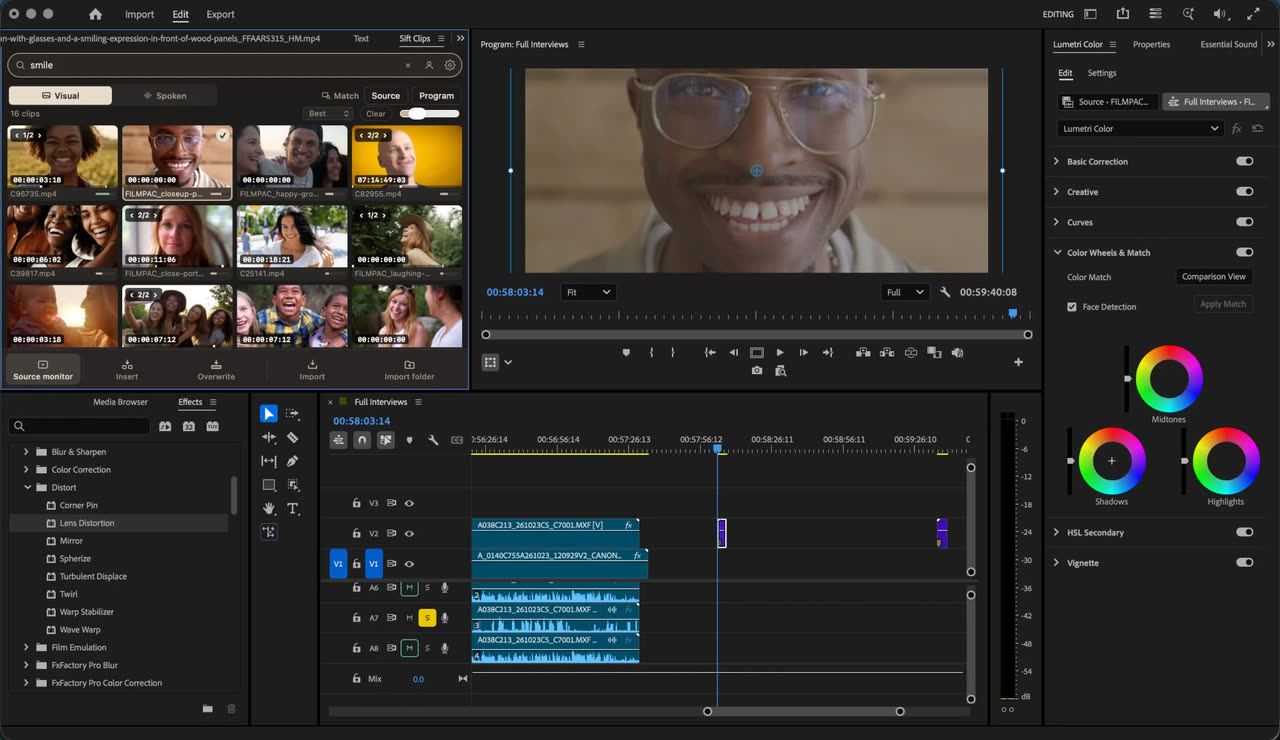
In short: Sift is a Mac and Windows desktop app that also works on its own, and has an optional panel for Adobe Premiere (Premiere Pro before version 26). It indexes every folder and drive you add, so you can search all your footage, not just what’s imported into the open project, by what’s on screen (Visual), what’s said (Spoken) and who’s in it (People). From the panel you can open a moment in the Source monitor or insert it at the playhead.
No editor needed. Sift works on its own as a desktop app on Mac and Windows: search, preview, build Selects and share footage by link without opening an editor. The editor panels are optional.
Get the panel.
The Sift Clips panel is free. Install it from the Sift app (Integrations › Premiere), or from Adobe’s Creative Cloud Marketplace: Sift Clips on Adobe Exchange. Either way it connects to the Sift Clips app on the same computer.

Adobe Premiere, formerly Premiere Pro.
Adobe renamed Premiere Pro to Adobe Premiere with version 26 in January 2026. Sift’s panel works with Premiere Pro 25.6 and with Adobe Premiere 26 and later. If you’re deciding between Adobe’s built-in Search panel and Sift, our comparison says when each is enough.
What the panel does.
- Import selections into a Sift bin.
- Open a clip in the Source monitor.
- Insert or overwrite a moment at the playhead in an open sequence.
- Receive Selects groups from the Sift app as named bins.
These are panel actions rather than drag-to-timeline gestures.
How it works.
- Add your drives
Point the Sift app at your footage folders and drives. It indexes them on your computer and keeps up as you shoot.
- Add the panel
In the Sift app, Integrations › Premiere sets it up in one click, or get Sift Clips from Adobe’s Creative Cloud Marketplace.
- Search and insert
Search, check the moment, and open it in the Source monitor or insert it at the playhead.
Why editors use it.
Search footage on every synced drive, imported or not. Sift files what you bring in under bins that mirror your folders.
Describe a shot, search a quote, or name someone once and find every clip they’re in.
Send a Selects group from the app and it lands in Premiere as a bin.
Indexing and search run locally. Your footage isn’t uploaded to search it.
Questions
Is it on Adobe’s Marketplace?
Yes. Sift Clips is on Adobe Exchange, the Creative Cloud Marketplace, as a free panel: https://exchange.adobe.com/apps/cc/97e9526f/sift-clips. It needs the Sift Clips app running on the same computer.
Does it work with the new Adobe Premiere?
Yes. Adobe renamed Premiere Pro to Adobe Premiere with version 26 in January 2026. Sift’s panel works with Premiere Pro 25.6 and with Adobe Premiere 26 and later.
Doesn’t Premiere Pro already have search?
Premiere’s own search works on media in the open project. Sift searches every synced folder and drive, whether or not it’s in a project, keeps one library across all your projects, and also works in DaVinci Resolve.
Can I search for what someone said?
Yes. Switch to Spoken and type the words. Sift transcribes speech in your footage and jumps to the line.
Does the panel work on Windows?
Sift for Windows includes the Premiere panel. It has had less real-world testing on Windows than on the Mac, so if setup doesn’t work, email us and we’ll fix it fast.
What does it cost?
$99 a year for one computer, Mac or Windows. Free for 3 days or 25 searches. No card. The Premiere Pro, DaVinci Resolve and Final Cut Pro panels are included.
Updated 2026-10-22
Keep reading.
Try it on your own footage.
Free for 3 days or 25 searches. No card. Then $99 a year for one computer, Mac or Windows. Everything in Sift, including the optional editor panels and one free link to share footage.